Data and Error Outputs on Data Queries and GenAI
Certain runbook An automated workflow that executes a series of steps or tasks in response to a triggered event, such as the detection of anomalous behavior generating an incident, a lifecycle event, or a manually executed runbook. nodes can fail when the platform cannot complete a query or a GenAI (Generative AI Generative AI. Artificial intelligence technology that can generate new content, such as text, based on learned patterns from training data.) request. When that happens, you often still need the automation to react in a controlled way, for example by showing a clear message to an operator rather than stopping the whole path with no context.
The following node types expose two outputs on the canvas:
-
Data Ocean Data Query
A runbook node category that gets data about the trigger and forwards it to other nodes in the runbook for further processing. nodes (every Data Queries subtype that queries the collected data set). For shared data query properties such as filters, limits, and metric collection, see Data Query Properties. -
The Data Store data query node.
-
The GenAI node under Functions. Use that topic for model instructions, query, inference options, and debug behavior.
Add error handling in the Runbook Editor
Wiring the Error output lets a failed query or model call continue into a branch you design instead of ending the path with no follow-up. The steps below cover opening the runbook, selecting the node, connecting the Error handle, and reading Error Response data downstream.
To add optional error handling:
-
Open the runbook in the Runbook Editor.
-
Select the node you want to protect: a node in the Data Queries group (any subtype that queries collected data), the Data Store node, or the GenAI node.
-
Draw a wire from the node’s Error handle to the first node on your error path (for example, a node that records context or formats text for an operator).
-
Configure downstream nodes to read the Error Response properties you need, then complete the branch the same way you would for any other conditional path.
Meaning of the Data and Error outputs
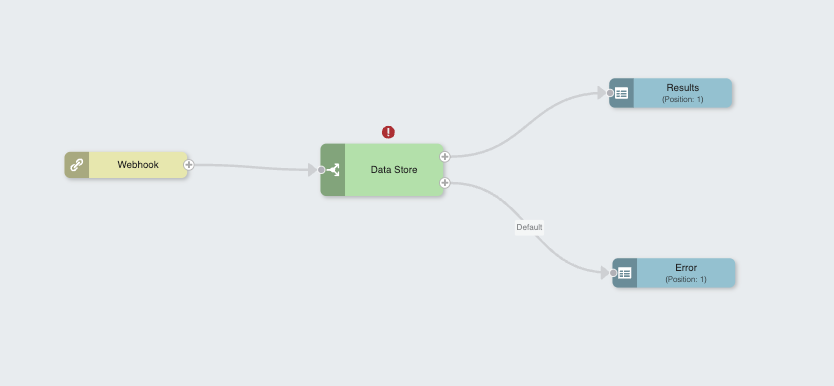
Each of these nodes has a Data output and an Error output.
-
Data: Carries the successful result in the same form as in earlier releases, before the separate Error output was available. Wire downstream logic to Data when you expect the node to succeed.
-
Error: Becomes relevant when the node reports a failure. Use it when you want a dedicated branch of the runbook to run only on error.
Error output behaviors
The Error output behaves in two distinct ways, depending on whether you connect downstream nodes to it.
Behavior when the Error output is not wired
If you leave the Error output disconnected, a failure behaves as it did previously. The runbook stops on that branch because there is nowhere for the error path to continue.
Behavior when the Error output is wired
If you connect one or more nodes to the Error output, a failure no longer ends the branch silently. Execution continues along the error path so you can decide what happens next.
For example, you can log the failure, branch with logic nodes, call an external system, or surface guidance such as asking the user to try again later when Riverbed IQ Ops Assist cannot complete a model call.
Using the error payload in downstream nodes
Nodes attached to the Error output receive an Error Response object you can reference like other structured runbook data. Use these values in variables, transforms, HTTP Hypertext Transfer Protocol. A protocol used for transmitting data over the internet, commonly used in webhook runbooks and integrations with external systems. requests, or user-visible steps so your automation can react based on the type of failure. Exposed fields include the following:
-
Error Code: Identifier for the failure category when the service provides one.
-
Error Message: Primary description of what went wrong.
-
Error Target: The configuration element, request field, or resource the error refers to when applicable.
-
Inner Error: Nested or underlying error information when the platform wraps another failure.
-
Error Details: Additional diagnostic properties when the service includes them.
For diagnostic codes that appear while you troubleshoot runbook execution, see Runbook debug error codes.