Core Assurance Workflow
Core Assurance follows a repeatable cycle: you define a test, send it to endpoints, and respond when enough endpoints fail. The following sections walk through the cycle from start to finish and describes how a typical operator uses Core Assurance. For the terms used here, see Core Assurance Overview.
End-to-end workflow
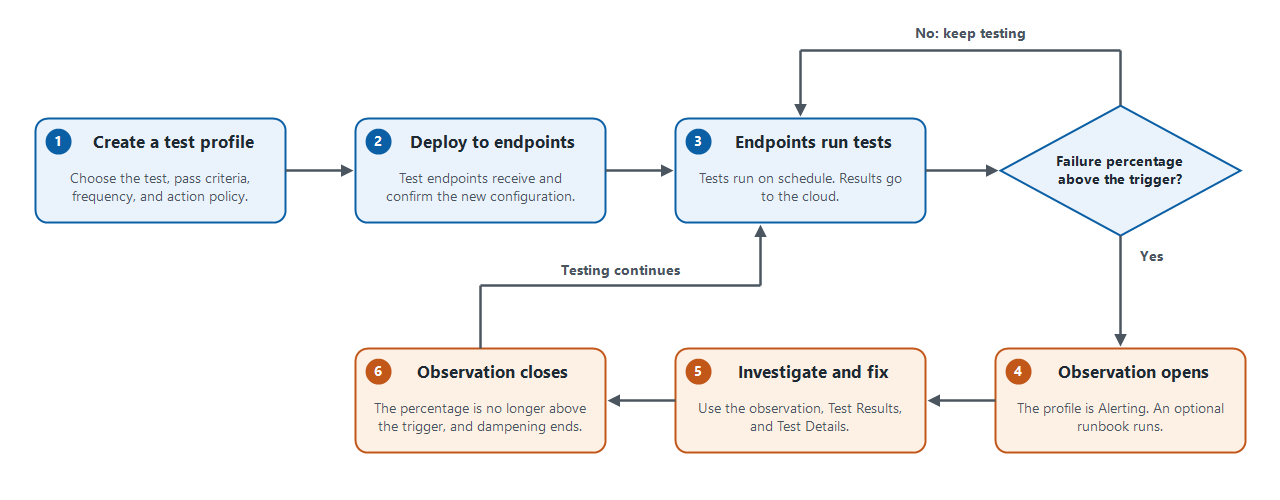
The following diagram shows the full Core Assurance cycle. The blue stages run continuously after you set up a test profile. The orange stages happen only when enough endpoints fail.
-
Create a test profile: Choose the test type and target, the pass criteria for a single run, how often the test runs, and the action policy. You set the test type, target, pass criteria, frequency, and action policy in the test profile wizard. See Create a Test Profile.
-
Deploy to endpoints: Select the test endpoints that run the profile. Core Assurance sends the profile to the selected endpoints, and each endpoint shows Pending Sync until it confirms the new configuration. See Sync statuses.
-
Endpoints run tests: Each endpoint runs the test on schedule and sends the result to the cloud. Each run passes or fails against the pass criteria. While the percentage of online endpoints that fail is not above the trigger, no action is taken and testing continues. You can review every run on the Test Results page. See Test Results Page.
-
Observation opens: When the percentage of online endpoints that fail is above the trigger, the profile status changes to Alerting. Core Assurance opens an observation
 A record of a condition in your environment that needs attention. Observations appear on the Observations page and in the Observation Feed widget, and they move through lifecycle states. For example, Core Assurance creates an observation when the percentage of online endpoints that fail a test is at or above the trigger set in the test profile., and runs an automation Automated procedures that are executed as the result of a trigger. Automations consist of a single entry point and a sequence of connected nodes that define the processing logic. if the action policy includes one.
-
Investigate and fix: Use the observation and the Test Results and Test Details pages to find which endpoints are failing and why. Then fix the cause outside Core Assurance.
-
Observation closes: When the failure percentage is no longer above the trigger, the profile enters its dampening period. If the trigger is not met again before the period ends, the observation closes. The endpoints keep testing throughout. See Core Assurance Observations.
Typical operator journey
Operators will generally use Core Assurance in the following order:
-
Open Core Assurance and scan the landing page for failed tests.
-
Create or update a test profile in the six-tab wizard.
-
Confirm that the assigned endpoints are online and that the profile is in sync. See Test Endpoints.
-
Use the Test Results and Test Details pages to investigate failures.
-
Review the Supporting Artifacts and Actions cards on each open observation for analysis and suggested next steps.
-
Track each observation until it closes at the end of its dampening period.
For short, task-based versions of the workflow, see Core Assurance Common Tasks.