Data Forensics Filter Bar
The Data Forensics Filter Bar is a powerful tool in the Main Table configuration options that allows you to filter the Main Table data to find specific affected machines. The Filter Bar supports chaining multiple filters using logical operators such as AND to narrow results.
To use the Filter Bar:
-
Click the Filter Bar
-
Select applicable operation
-
Select the specific data.
Note: You may end your query here, or continue specifying. Depending on the group by and data selected, you may have more options to specify. -
Click the magnifying glass icon to begin the search.

Filter Bar Example
The following describes an example using the filter bar to find machines using Aternity Agent from a Windows 11 Enterprise device.
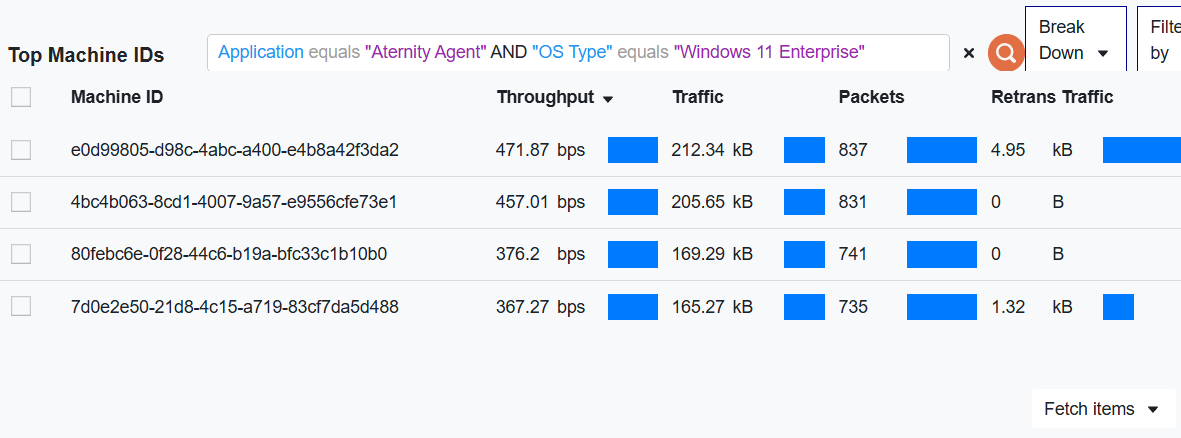
-
Click the Filter Bar.
-
Select Applications group by.
-
Select equals.
-
Select Aternity Agent.
-
Select AND.
-
Select OS Type.
-
Select equals.
-
Select Windows 11 Enterprise.
-
Click the magnifying glass icon.
You now have the individual machines using Aternity Agent from a Windows 11 Enterprise OS device. You can select any row in the table to drill down further in the Widgets Pane.