Upgrading an Integration
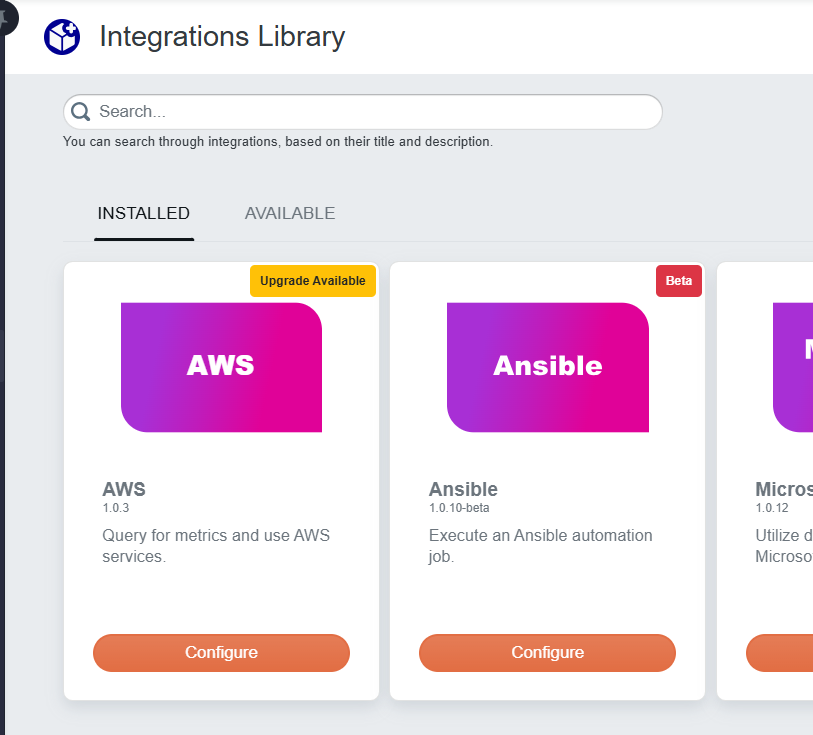
Integrations are updated over time with fixes, new features, or updated subflows A reusable automation chunk that performs frequently used functions, such as opening a ticket in an external system, and can be used to implement integrations with third-party systems.. Upgrading moves your installed integration to the latest version so you can use those improvements. When a newer version is available, the UI User Interface. The visual components and controls that users interact with to access features and manage the system. shows an Upgrade Available tag on the integration's card in the Installed tab of the Integrations Library, as shown below.
To upgrade an integration:
-
Click Configure on the integration card that shows the Upgrade Available tag.
-
In the integration dialog, click Upgrade to start the upgrade.
-
In the confirmation dialog, click Upgrade to confirm.
-
When the success dialog appears, click OK.
-
The integration dialog reopens automatically.
-
-
Review the integration dialog for any configuration fields that were added or changed in the new version and update them if needed.
If an integration upgrade makes changes to the minor version of a subflow, then all runbooks that use that subflow will be updated to the new version of the subflow.
If an integration upgrade makes changes to the major version of a subflow, then you will have to go to your runbooks that use that subflow and update the subflow to the new major version. For details on subflow versioning, see Updating a Subflow to a New Version in Subflow Overview.