Lists of Harvests
The Packet Capture Module maintains a comprehensive history of all harvest The process of retrieving PCAP files from devices and transferring them to a customer-provided repository for analysis. operations performed across your environment. This history provides visibility into when packet capture Packet Capture. A file format that contains captured network packet data, typically used for network analysis and troubleshooting. (PCAP) files were created, which devices An entity type representing network devices or hardware components deployed in the customer environment that are monitored for performance and anomalies. were involved, and the time ranges captured.
Where to Find Harvest History
Harvest History is displayed in Device List in the PCM Web UI. Below each device's capture job list, you will see a Harvest History section showing all harvests performed on that specific device.
Information Displayed in Harvest History
Each harvest entry in the history includes the following details:
-
Harvest Name: The name assigned to the harvest.
-
Device Name: The hostname or identifier of the device where the harvest was performed.
-
Harvest Timestamp: When the harvest operation was initiated.
-
Time Range: The specific time period captured (for example, Last 30 minutes or Full buffer).
-
File Size: The size of the generated PCAP file.
-
Status: Whether the harvest completed successfully or encountered an error.
-
Filter: A filter icon appears when a Berkeley Packet Filter (BPF
Berkeley Packet Filter. A syntax for selecting which network packets are captured or harvested based on protocol, address, port, and other packet attributes.) was applied at harvest time. Click the icon to view the filter value. -
Repository Link: A direct link to the PCAP file in your configured storage repository, or a chain icon for CIFS and Local harvests.
Accessing harvested packet capture files

For harvests stored in a cloud repository (Amazon S3 or Azure Blob Storage), each harvest entry includes a hyperlink that takes you directly to your configured storage repository. Click the repository link to:
-
View the full contents of your repository.
-
Download the PCAP file of interest.
For CIFS and Local harvests, there is no cloud link. Instead of the repository icon, a chain icon appears in harvest history. Click the chain icon to copy the target path to the clipboard. Paste the path from the clipboard to access the harvested PCAP file on the share or local path.
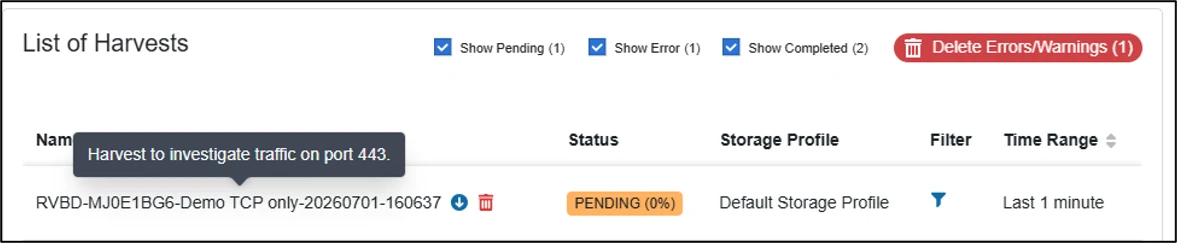
If you entered a note when you created the harvest, hover over the harvest name to view it.
Filtering and Searching Harvest History
Use the filtering capabilities in the PCM Web UI to focus on specific harvests:
-
Time-based filtering: Filter harvests by date range or specific time periods.
-
Device filtering: View harvests from specific devices or device groups.
-
Status filtering: Show only successful harvests, failed harvests, or all harvests.
-
Search functionality: Use the search bar to find specific harvests by device name, time range, or other criteria.
Harvest History Retention
Harvest history is maintained for the duration of your PCM deployment. Historical data helps you:
-
Track harvest activities over time.
-
Maintain compliance and audit requirements.
-
Manage capacity and storage requirements.