Packet Capture Module Operations
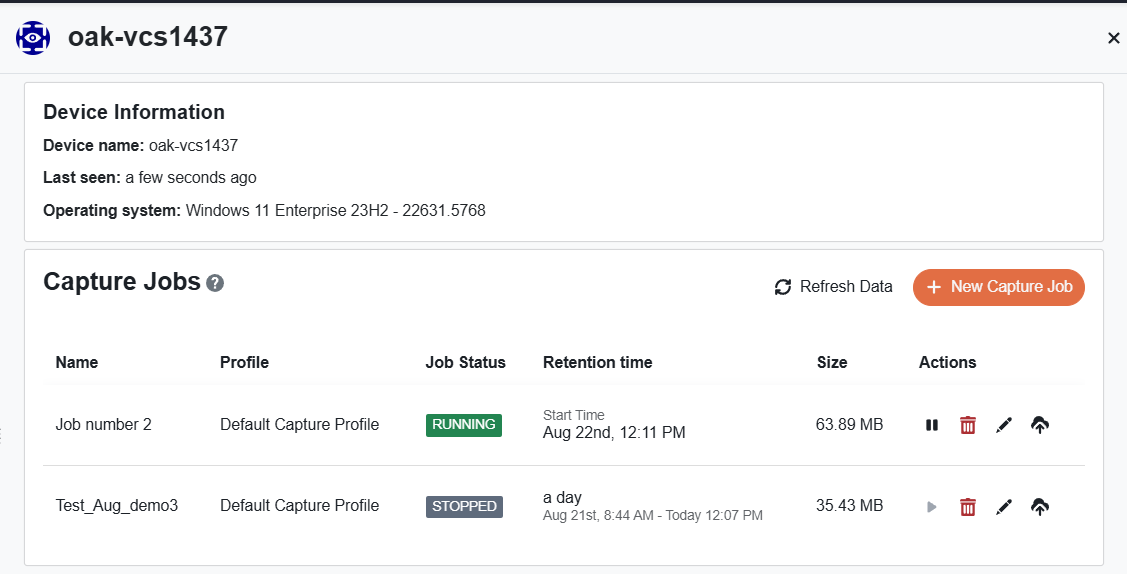
Some operations are dependent on your RBAC assignments, the state of the module, and the state of capture jobs. The UI User Interface. The visual components and controls that users interact with to access features and manage the system. will enforce restrictions by either dimming buttons when the operation is not available or via pop-up messages that require your approval.
New Capture Job
Use the new capture job Writes network packets to local disk for continuous or on-demand captures. button to start a capture on a selected device. When you start a capture job, you provide a name for the capture job and select a capture profile A configuration template that defines packet capture parameters.. The capture profile determines which packets are captured and how the capture behaves, including whether it runs as a continuous capture or an on-demand capture. The capture job writes network packets to local disk on the device.
The Packet Capture Module supports up to three concurrent active captures per device. Each capture job must use a different capture profile with unique filters and size, time, or packet limits. Capture jobs can be stopped and then started again using the same capture buffer.
Start Capture
Click this button to resume a previously stopped capture job on the selected device.
Rename Capture
You can rename either an active or inactive capture job.
Stop Capture
For any active capture, you have the option of stopping the capture job. The packets remain in this capture job on the end point device until you either harvest The process of retrieving PCAP files from devices and transferring them to a customer-provided repository for analysis. from this capture job, or you delete the capture job.
Delete Capture
You can delete an active or stopped capture to free up disk space. The UI will prompt you with a confirmation message.
Harvest Packets
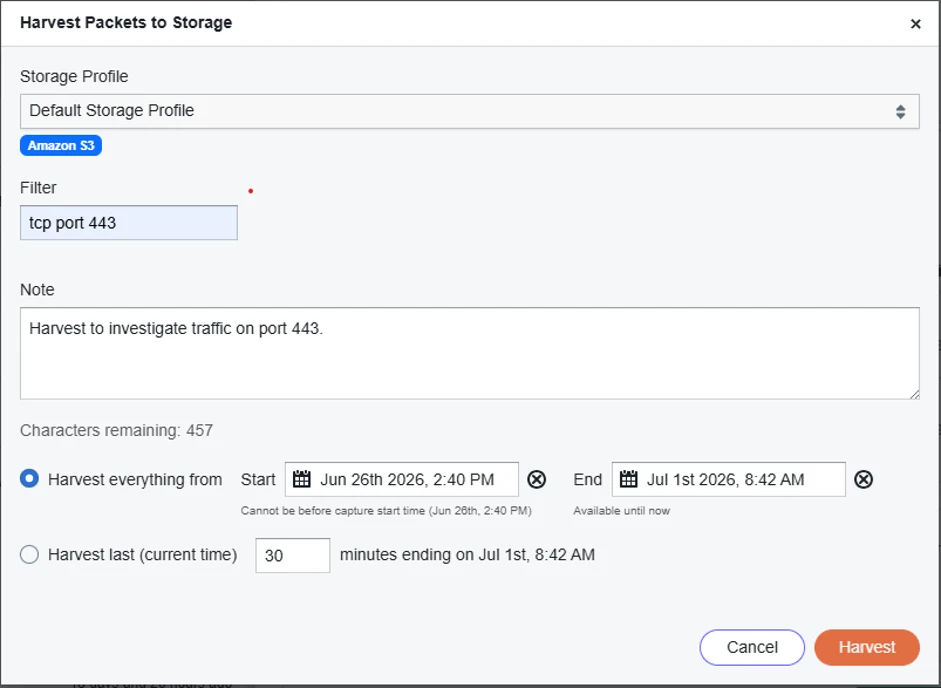
The Harvest operation supports the following harvest modes:
-
Harvest the last
nnminutes of time, working backward from the current time, or a configured time range. -
Harvest the entire contents of the continuous capture rolling buffer.
You can also configure the following optional fields:
-
Harvest BPF Filter: Apply a Berkeley Packet Filter (BPF
Berkeley Packet Filter. A syntax for selecting which network packets are captured or harvested based on protocol, address, port, and other packet attributes.) at harvest (query) time, not just at capture time. The harvest-time BPF Berkeley Packet Filter. A syntax for selecting which network packets are captured or harvested based on protocol, address, port, and other packet attributes. is additive. It narrows what is extracted from the already-stored packet capture buffer. It does not replace the capture-time BPF Berkeley Packet Filter. A syntax for selecting which network packets are captured or harvested based on protocol, address, port, and other packet attributes.. This option allows you to retrieve a targeted subset of already-stored packets without recapturing. -
Note (optional field): Add a note to the harvest to provide additional context. The contents of this field are displayed in the harvest list. Hover over the harvest name in harvest history to view the note.
Packet Capture. A file format that contains captured network packet data, typically used for network analysis and troubleshooting. file for harvest, the Packet Capture Module will attempt to estimate if the percent free space threshold would be violated once the PCAP file is created. If the calculation asserts we would be in violation of the threshold, the harvest will return an error.Viewing History of Harvest Commands
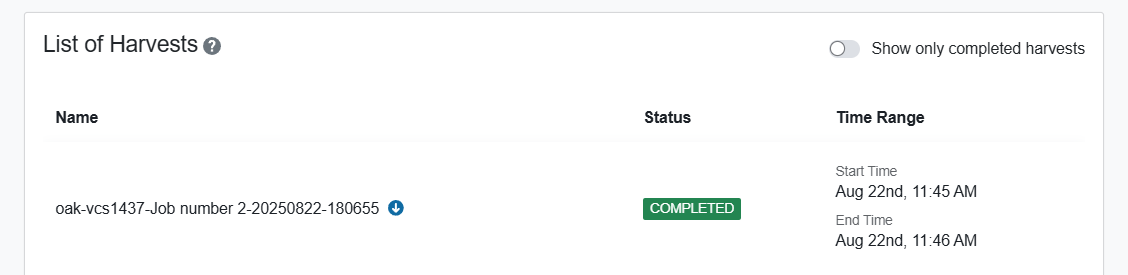
Just below the list of capture jobs for each device, you will see a historical reference of harvest operations that have been executed for this device. Each harvest entry includes a hyperlink to your customer-provided repository, or a chain icon for CIFS and Local harvests. For details on harvest notes, BPF Berkeley Packet Filter. A syntax for selecting which network packets are captured or harvested based on protocol, address, port, and other packet attributes., and accessing harvested files, see Lists of Harvests.